

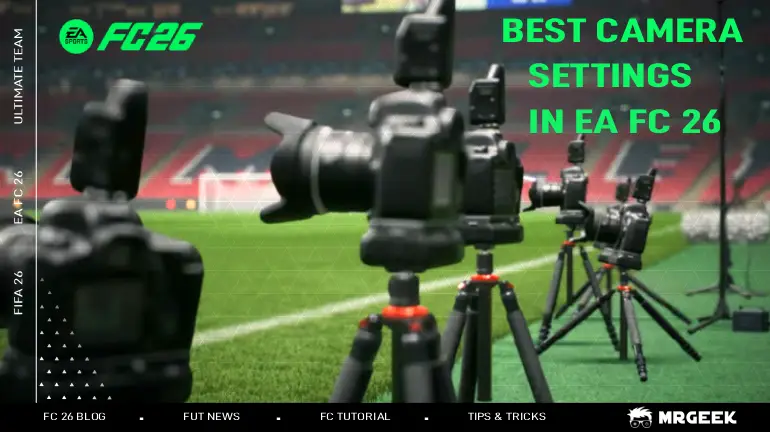
Your camera angle in EA FC 26 is more than just a viewpoint—it's your primary tactical tool. With 12 different Camera’s settings in FC 26 available, choosing the right one is essential for gaining a competitive advantage. The camera you play with shapes almost everything about how you experience a match: how early you spot a runner making a diagonal into the box, how easily you track back defensively, and how naturally passing lanes present themselves. Two players with identical skill can have wildly different results simply because one is working with a camera that suits their playstyle and the other isn't. This complete guide provides the full list of all available cameras and reveals the optimal configurations used by top players to enhance field vision, improve decision-making, and ultimately dominate the pitch.
Whether you're looking to leverage the strategic advantage of the Co-op camera or need to know how to adjust your settings mid-match, this guide has you covered.
Planning to build a strong Ultimate Team from day one? Buy FC Coins from the MrGeek to complete SBCs, trade on the market, and strengthen your squad before prices rise.
Full List of Available Camera view in EA FC 26
FC 26 offers 12 different camera views, giving you extensive control over how you view the match. You can adjust these settings in several ways to suit your preference in any game mode. Each camera is built around a different balance of field of view, zoom, and height, so what feels natural to one player can feel disorienting to another—it's worth trying a handful of these in a Kick-Off match before settling on one for competitive play.
- Broadcast
- Classic
- Co-op
- Dynamic
- EA Sports GameCam
- End to End
- Legacy
- Pro
- Tactical
- Tactical Focus
- Tele
- Tele Broadcast
What is the best camera setting in FC 26?
While personal preference plays a role, the Co-Op camera is objectively the best starting point for most players in FC 26. Its primary advantage is the unparalleled field of view, transforming how you read the game. Because it sits further back and higher than most other options, it gives you a much wider picture of both your own shape and the opponent's off-the-ball movement—making it especially useful for spotting runs in behind and organizing your defensive line before pressure arrives.
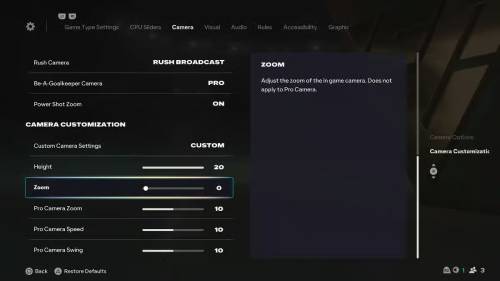
here are the full best camera settings in FC 26:
- UT Competitive Camera: Off
- Camera: Co-Op Power Shot
- Zoom: Off
- Height: 20
- Zoom: 0 Pro Camera
- Zoom: 10
- Pro Camera Speed: 10 Pro
- Camera Swing: 10
By using this configuration, you equip yourself with the best visual tool to make smarter decisions and dominate the pitch. It's worth noting that these values aren't set in stone—treat them as a strong starting point rather than a fixed rule. If you find the height or zoom slightly too aggressive for your monitor size or seating distance, small adjustments of 2–3 points at a time usually make a noticeable difference without losing the core benefits of the setup.
How to Change Camera settings in FC 26
- From the Main Menu: Go to Customize → Settings → Game Settings → Camera.
- Before a Match: Access the settings from the pre-match menus in Kick-Off, Career Mode, and Pro Clubs.
- During a Match: Pause the game and find the Camera option in the settings menu.
How to Change Camera Before a Match in FC 26
You can easily adjust your camera angle just before a match starts. Here’s how:
- From the pre-match screen (after you've selected your teams), navigate to the Game Settings menu.
- Inside Game Settings, press the R1 (PlayStation) / RB (Xbox) button once to tab over to the Camera settings.
- Here, you can select your preferred Camera type (like Co-op, Tele Broadcast, etc.) and adjust other settings like Height and Zoom.
Where this works:
- Kick-Off Mode
- Career Mode (both Player and Manager)
- Pro Clubs match lobby
- Ultimate Team (in pre-match settings, unless UT Competitive is on)
- Any changes you make here will only apply to that specific match.
How to Change Your Camera Mid-Match in FC 26
If your current camera angle isn't working for you during a match, you can change it instantly without quitting. Follow these steps:
- Pause the Game: Press the Options button on PlayStation or the Menu button on Xbox to bring up the pause menu.
- Open Settings: Navigate to and select the Settings option.
- Enter Game Settings: From there, choose Game Settings.
- Go to the Camera Tab: Press the R1 (PlayStation) / RB (Xbox) button once to switch to the Camera tab.
- Adjust Your Settings: You can now change your Camera type, Height, Zoom, and other visual settings. The changes will take effect immediately once you exit the menu and resume play.
Important Note:
- This feature allows you to adjust your view on the fly if your current camera isn't giving you the right perspective for attack or defense.
- If you're playing Ultimate Team with UT Competitive Camera enabled, mid-match camera changes may be restricted—switch it off beforehand if you want full flexibility during the game.
Why Camera Settings Matter in FC 26
Your camera settings in FC 26 are a crucial tactical advantage. While the default view works for some, optimizing it for competitive play like Division Rivals or Champions can transform your game. The right settings provide a superior field of view for smarter plays, enhance precision for passing and defending, and ultimately lead to faster, more efficient reactions on the pitch. A common mistake newer players make is sticking with whatever camera the game defaults to, without ever testing alternatives—given how much this single setting can affect decision-making speed, it's one of the easiest free upgrades available to any player, regardless of skill level.
Common Mistakes When Choosing a Camera
- Sticking with the default without testing alternatives: Many players never realize how much a camera change can improve their game simply because they've never tried anything other than the preset view.
- Copying pro settings without adjusting for personal comfort: A configuration used by a top competitive player isn't guaranteed to suit everyone—height and zoom especially should be fine-tuned to what feels natural on your own screen.
- Switching cameras too often: Constantly changing your camera between matches can slow your reaction time, since your brain needs a few sessions to fully adapt to a new perspective.
- Ignoring camera height and zoom in favor of camera type alone: The base camera (like Co-op or Tactical) is only half the picture—height, zoom, and swing settings meaningfully change how that camera plays even within the same preset.
Troubleshooting: Camera Feels Off After Changing Settings
If a new camera setup feels disorienting rather than helpful, it's rarely a sign the camera itself is bad—more often it just needs a short adjustment period. Give any new configuration at least a handful of matches before deciding whether to keep it, since your eyes and reflexes need time to recalibrate to a different field of view. If it still feels wrong after that, try adjusting height or zoom in small increments rather than switching to an entirely different camera type, as this often resolves the issue while keeping the core benefits you were looking for.
How FC 26 Camera Settings Help You Earn More EA FC 26 Coins
Optimizing your camera settings in EA Sports FC 26 is a free upgrade that directly helps you win more and earn more FC Coins. A better view of the pitch (like with the Co-op camera) leads to smarter passes, stronger defense, and quicker decisions.
This gameplay advantage is key to earning more coins:
- Win More Matches: Better vision means more wins in rivals and Champions, which award the most FIFA Coins.
- Maximize Rewards: Consistently higher rankings yield bigger coin payouts and valuable packs.
Simply put, the right camera settings sharpen your gameplay, leading to more victories and greater rewards.