

Building your ultimate squad in EA FC 26 often requires tactical flexibility. What happens when you need a striker but can't afford one? While you can use the game's retraining system for new roles (which has specific rules we'll cover below), sometimes the fastest way to solve a squad crisis is to buy FIFA Coins from a trusted source like mrgeek.net to secure the perfect player instantly.
This guide will break down how to change player positions in both Manager and Player Career modes, giving you both immediate and long-term solutions for your team.
How to Change Positions in FC 26 Manager Career Mode
- Open Squad Hub: From the main menu in Manager Career, navigate to the Squad Hub.
- Select a Player: Choose the player you want to retrain—for example, a central midfielder you’d like to turn into a defensive anchor.
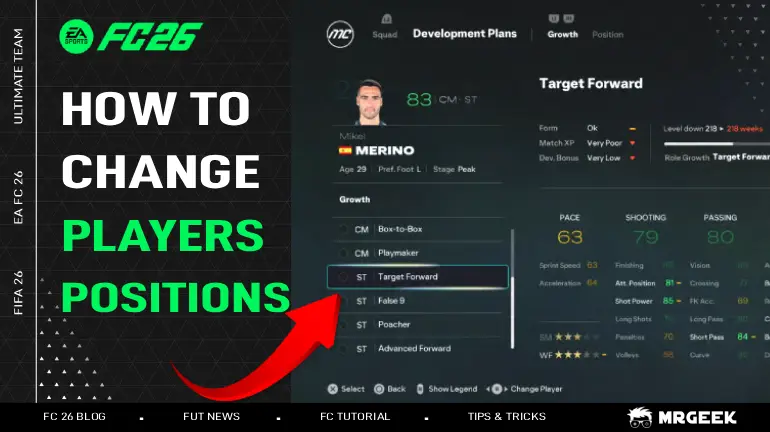
- Go to Development Plan: Select the “Development Plan” option from the player menu.
- Choose a New Position:You’ll see the player’s current role (e.g., Box-to-Box Midfielder) along with a list of available positions they can learn.
- Confirm and Begin Training: Select the new position and confirm. The player will now begin retraining. Training time varies based on how different the new role is.
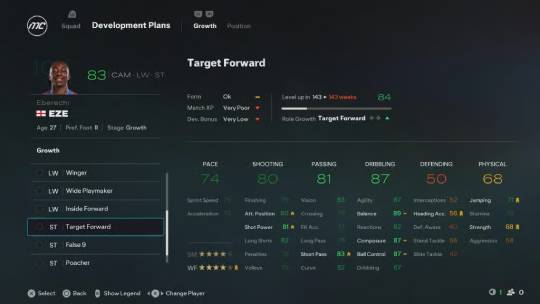
Pro Tip:
- Retraining is best for small adjustments (e.g., a CDM to a CM) or activating a secondary position a player already possesses. Drastic changes are often impractical due to the extremely long training time.
How to Change Positions in FC 26 Player Career Mode
For those controlling a single athlete, the rules are very different and more restrictive.
- Created Players: If you are starting a save with a newly created player, you cannot change your primary position after the initial selection. Your choice is permanent for that save. This is because your position is now tied to your chosen Archetype, which defines your core skills and playstyle.
- Existing Real Players: If you choose to play as an existing professional (like Kylian Mbappé), you are limited to the positions they are already qualified for. You can request the AI manager to play you in one of your alternate positions, but you cannot learn new ones.
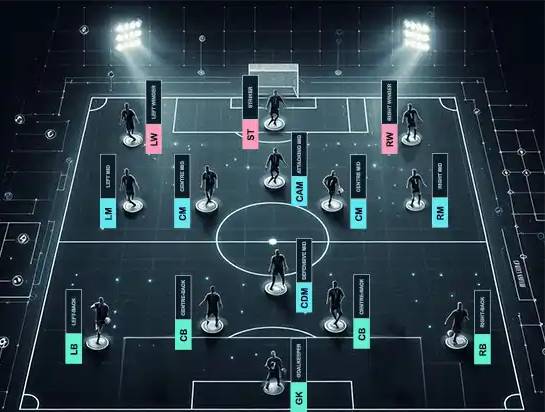
All FC 26 Player Positions
A team's eleven players are each assigned a specific role and area of operation on the pitch, forming the foundation of its strategy.
- Goalkeeper (GK): The last line of defense. Unique in their ability to use hands, their primary task is to prevent goals. They operate almost exclusively within the penalty area and are distinguished by their jersey color.
- Centre-Back (CB): The defensive anchor. Operating centrally, their core duties are to stop opposition attacks, win aerial duels, and initiate play from the back. Strength, positioning, and tackling are essential.
- Full-Back (RB / LB): The wide defenders. Positioned on either flank, they defend against wingers, block crosses, and provide width by supporting the attack from the sidelines.
- Defensive Midfielder (CDM): The midfield shield. Situated in front of the defense, they break up opposition plays, protect the backline, and recycle possession to start attacks.
- Centre Midfielder (CM): The engine of the team. These players link defense and attack, controlling the game's tempo through passing, vision, and tactical awareness. They contribute to both phases of play.
- Central Attacking Midfielder (CAM): The primary playmaker. Operating in advanced central areas, their role is to create scoring chances with incisive passes, technical skill, and intelligent movement between the lines.
- Winger (RW / LW): The wide attackers. Using pace and dribbling, they take on defenders to deliver crosses into the box and cut inside to score. They stretch the opposition's defense.
- Striker (ST): The focal point of the attack. Their main objective is to score goals. They must possess excellent finishing, hold-up play, and the ability to beat defenders in one-on-one situations.
FAQ
Can I change position in FC 26 Career Mode?
Yes. In the Development Plan menu, press R2/RT to switch to the 'Position' tab and assign a new role for the player to learn.
What is the best strategy for retraining players in FC 26?
The most effective strategy is to focus on small adjustments. Retraining a player to a closely related position (e.g., Full-Back to Wing-Back, or CDM to CM) is fast and highly effective. It's also useful for "activating" a player's secondary position to improve their chemistry in your squad. Avoid drastic role changes (e.g., Winger to Centre-Back) as the training time will be excessively long and the player's attributes may not suit the new role effectively.
What are all the player positions in EA FC 26?
The 11 positions are: Goalkeeper (GK), Centre-Back (CB), Full-Back (RB/LB), Defensive Midfielder (CDM), Centre Midfielder (CM), Attacking Midfielder (CAM), Winger (RW/LW), and Striker (ST). Each has a unique role and area on the pitch.