
- Conta EA FC — Insira os dados da sua conta FC na página de entrega após o pagamento e inicie sua entrega.
Comprar Coins do FC 27
Coins do EA FC 27 Ultimate Team seguras para PlayStation, Xbox e PC pelo melhor preço.
4,9/5 | 2000+ AvaliaçõesA partir de
€14.89 /100K
Código 10%: GLORY
€14.89 /100K
Como comprar FC 27 Coins
1 Valor & entrega
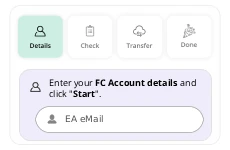
Selecione sua plataforma e a quantidade de FC Coins e finalize o pagamento. Depois do pagamento, escolha seu método de entrega na página de entrega.
2 Acompanhe a transferência
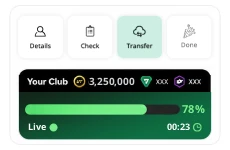
No Comfort Trade, insira os dados da sua conta EA FC para começar. O sistema inicia a transferência de Coins imediatamente. Acompanhe o progresso em tempo real pela barra de status ao vivo.
3 Receba seus FC Coins
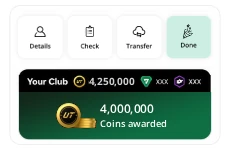
Transferência concluída! Seus FC 27 Coins já estão disponíveis no Ultimate Team. Entre novamente e use seus FC Coins para jogadores, itens de DME (SBC) e melhorias no elenco.
Métodos de entrega de FC 27 Coins
Comfort Trade
Totalmente automatizado Transferência máx. 5M Máxima segurança
Player Auction
Listagem manual Transferência máx. 500K Somente PS & Xbox
- Sem login da EA — O sistema mostra exatamente o jogador e o preço.
- Você compra e lista — Compre o jogador indicado pelo sistema e coloque-o à venda exatamente como instruído. Em seguida, o sistema compra seu jogador.
Compromisso de Entrega MrGeek
- Sistema de entrega protegido — Seus dados são criptografados, usados apenas dentro do sistema automatizado fechado da MrGeek e não são armazenados após a entrega.
- Quantidade exata de Coins — Cobrimos todos os custos dos jogadores e a taxa de 5% da EA para que você receba exatamente a quantidade comprada.
Seguro. Rápido. Confiável.
Mais de 350.000 jogadores satisfeitos confiam na mrgeek.net.

350K+
Clientes satisfeitos
Garantia de reembolso
Segurança comprovada desde 2019
- Jogo: EA FC27
- Edição: Ultimate Team
- Disponível em Todos os países
PROTEÇÃO DA CONTA
É seguro comprar FC 27 Coins?
Atualizado Set. 2026
Desde 2019, a MrGeek aperfeiçoa a entrega de FC Coins com algoritmos automatizados, preços de mercado em tempo real, cartas de jogadores cuidadosamente selecionadas e verificações de segurança otimizadas por IA.
- Processo de entrega controlado — O sistema fornece instruções específicas de jogadores, preços e limites de transferência para cada pedido.
- Garantia de proteção durante a temporada — Sua conta fica protegida durante toda a temporada do FC 27 quando você usa apenas a MrGeek e segue nossas instruções de entrega.
- Proteção da conta e dos dados — Os dados do Comfort Trade são inseridos somente após o pagamento dentro do sistema de entrega protegido. O Player Auction não exige seu login da EA.
Pronto para pedir seus FC 27 Coins? Comprar agora
Por que escolher a MrGeek para FC 27 Coins?
| Recurso | MrGeekNossa loja |
|---|---|
| Serviço seguro de FC Coins | Desde 2019 |
| Sistema de entrega próprio | Sem vendedores externos |
| Início do pedido | Imediato |
| Tempo normal de entrega | 15–60 min |
| Disponibilidade | 24/7 · Totalmente automatizado |
| Máximo no Comfort Trade | Até 5M |
| Acompanhamento do pedido | Em tempo real |
| Proteção durante a temporada | Toda a temporada do FC 27 |
| Quantidade exata de Coins | Todos os custos + taxa de 5% da EA incluídos |
| Garantia de reembolso | Reembolso integral |
| Regiões & plataformas | Mundo todo · PS · Xbox · PC |
| Pagamentos seguros | Pix · Cartões de crédito e débito · PayPal · Apple Pay · Google Pay |
| Preço por 1 milhão de FC Coins | €145.75 |
FAQ de FC 27 Coins

Alex
Para manter válida a Garantia de Proteção da Temporada da MrGeek, use apenas a MrGeek para transferências de Coins e siga os limites e intervalos mostrados no seu painel de entrega. Use uma senha forte da EA, mantenha a 2FA ativada e não compre nem venda jogadores muito acima ou abaixo do preço normal de mercado.

Leon
Contas novas devem começar com 500.000–1.000.000 de FC Coins. Contas mais antigas e ativas podem transferir até 5.000.000 de Coins de uma vez com o Comfort Trade. Para melhores resultados, deixe um intervalo de 24–48 horas entre transferências grandes.
Leon
Todos os pedidos começam imediatamente após o pagamento. A maioria é concluída em 15 minutos a 1 hora. Pedidos maiores podem levar mais tempo — 1.000.000 de FC Coins normalmente leva cerca de 2–3 horas. Acompanhe a entrega pela barra de status ao vivo.
Alex
FC Coins, também chamados de moedas do Ultimate Team, dão mais controle: use-os para compras no Mercado de Transferências, itens de DME (SBC) e pacotes elegíveis da Loja. FC Points são comprados da EA e usados principalmente em pacotes e Draft. Se você quer um jogador ou item de DME específico, FC Coins oferecem um caminho mais direto do que depender da sorte dos pacotes.
Leon
Para usar o Comfort Trade, você precisa ter acesso ao Mercado de Transferências no Web App ou Companion App. Jogue por pelo menos 2 dias ativos e complete 3 partidas completas do Ultimate Team por dia — Squad Battles, Rivals ou Champions; sair antes do fim não conta — e faça login no Web App ou Companion App no mesmo dia. Complete também os primeiros Objetivos do Ultimate Team. Guia oficial da EA →
Alex
Se você mudar de ideia antes da entrega, ou se não conseguirmos concluir a entrega dos seus FC Coins, reembolsaremos o valor integral. Entre em contato com nossa equipe pelo chat ao vivo para solicitar o reembolso.
