

I codici di backup sono progettati per aiutarti ad accedere al tuo Account EA se non puoi utilizzare il tuo solito metodo di autenticazione a due fattori (2FA). Tuttavia, a volte i giocatori scoprono che i loro codici di backup non vengono visualizzati o non funzionano. Ecco perché accade e come puoi risolverlo.
Come ottenere nuovi codici di backup
- Vai al sito web EA myaccount.ea.com/cp-ui/security/index e accedi al tuo Account EA.
- Apri le Impostazioni di Sicurezza e Privacy – Nel menu, vai su Sicurezza e Privacy.
- Vai alla sezione Autenticazione a Due Fattori.
- Clicca su visualizza codici di backup.
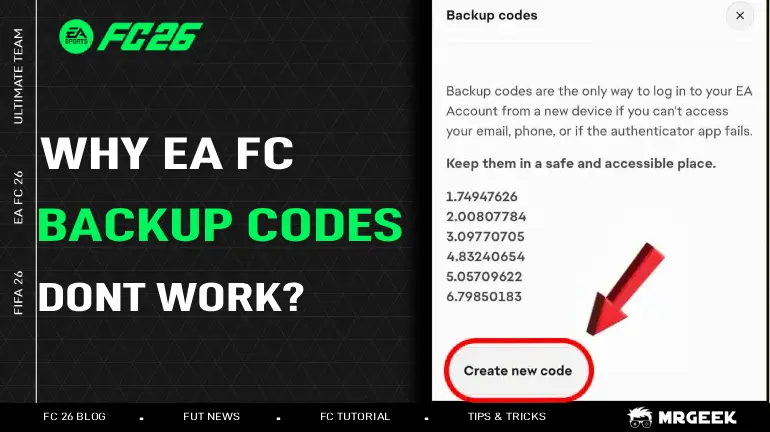
- Sotto i codici di backup elencati, clicca su “Crea Nuovi Codici di Backup“.
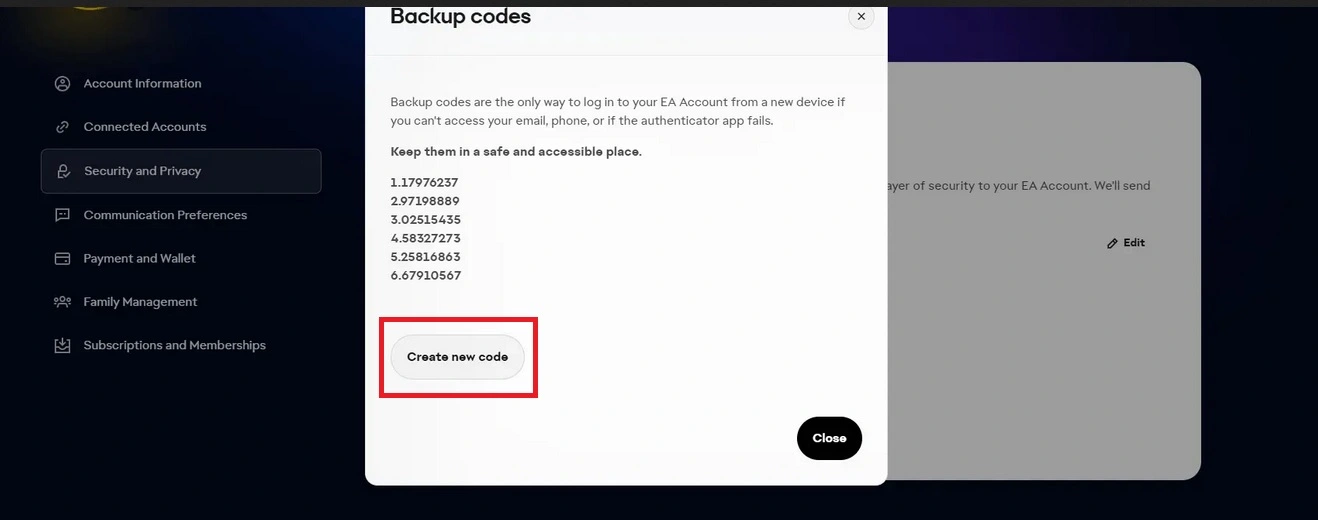
EA genererà 6 nuovi codici che potrai utilizzare.
Hai ancora problemi?
- Genera un'altra serie di codici di backup.
- Conferma che il tuo metodo 2FA funzioni correttamente.
Motivi comuni per cui i codici di backup EA non funzionano
1. L'autenticazione a due fattori (2FA) non è abilitata
- Se non vedi alcun codice di backup nel tuo Account EA, di solito significa che il 2FA non è stato attivato.
- Per generare i codici, abilita prima il 2FA nella sezione Sicurezza e Privacy delle impostazioni del tuo account. Se hai bisogno di aiuto, usa questo Tutorial.
- Una volta attivato, apparirà l'opzione per i codici di backup.
2. I codici usati non funzionano
- EA fornisce 6 codici di backup univoci.
- Ogni codice è utilizzabile una sola volta.
- Nel tuo account, i codici usati diventano grigi, mentre quelli non usati rimangono in grassetto e neri.
- Se tenti di riutilizzare un vecchio codice, non funzionerà. Quindi devi creare nuovi codici.
3. Potresti aver effettuato l'accesso all'account sbagliato
- Molti giocatori hanno più di un Account EA senza rendersene conto.
- Se nessuno dei tuoi codici funziona anche se hai creato codici di backup, ricontrolla di aver effettuato l'accesso all'Account EA corretto.
- Assicurati che i codici che stai inserendo appartengano all'account a cui stai cercando di accedere.