


Comfort Trade is an automated delivery method that transfers FC Coins directly into your Ultimate Team account — no listing players, no manual trading. This tutorial explains what Comfort Trade is, how it works, and walks through the process step by step.
Ready to try Comfort Trade? Explore the latest FC Coin options and choose the amount that fits your Ultimate Team. Buy FC Coins from MrGeek.
What Is Comfort Trade?
Comfort Trade is a delivery method where you provide your Ultimate Team login details so the system can log in and transfer coins directly to your account. It's different from Player Auction, where you list a specific player yourself and the seller purchases it to complete the transfer. Comfort Trade is generally the more hands-off of the two once your order is placed.
How Comfort Trade Works
Once you place an order and submit your account information, the delivery system verifies the details, logs in, and transfers the purchased coins automatically. You can track progress through each stage using the order status indicator, from verification through to completed delivery.
What You Need Before Starting
- Your platform (PlayStation, Xbox, or PC)
- The coin amount you want to purchase
- Completed payment for your order
- Correct and current Ultimate Team account login information
- Availability to check your account status if needed during delivery
Step-by-Step: How Comfort Trade Delivery Works
Step 1: Choose Your Platform
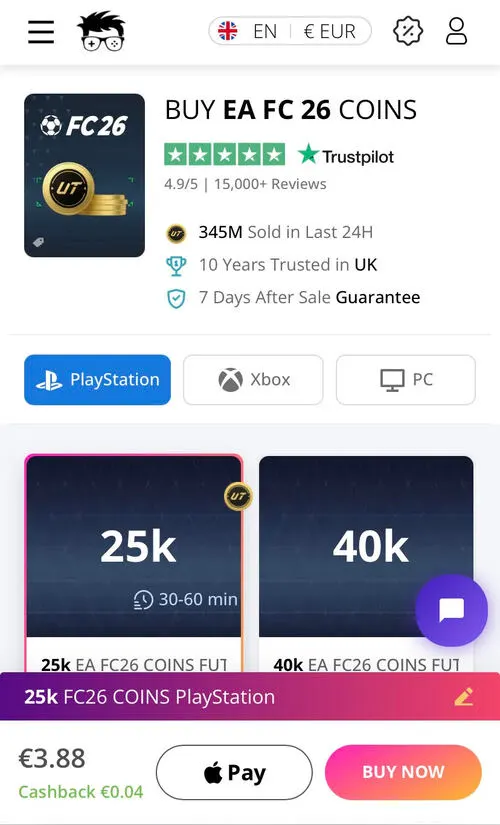
Head over to the FC Coins section and select your platform — PlayStation, Xbox, or PC. Then choose the amount of FC Coins you'd like to buy.
Step 2: Complete Your Payment
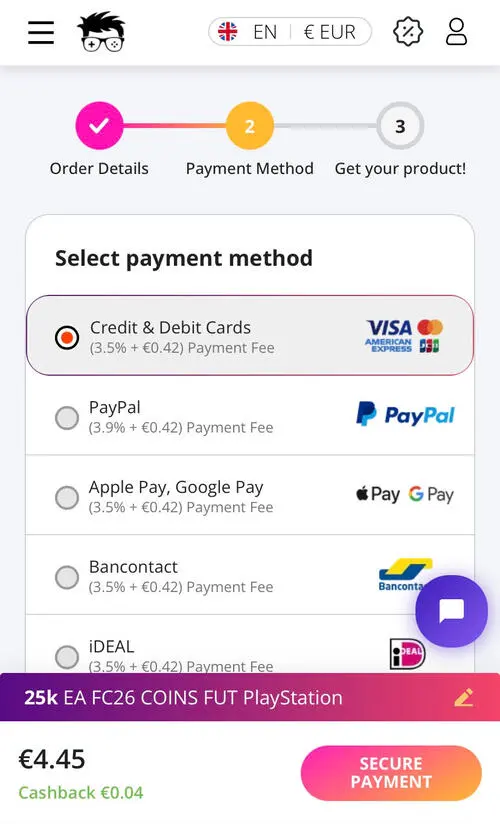
Click "Buy Now," select your preferred secure payment option (card, PayPal, Klarna, Bancontact, crypto, and others), and complete the payment by clicking "Secure Payment." Once payment succeeds, you'll see a confirmation on screen and receive an order confirmation email, then be redirected to the delivery page.
Step 3: Enter Your Ultimate Team Account Info
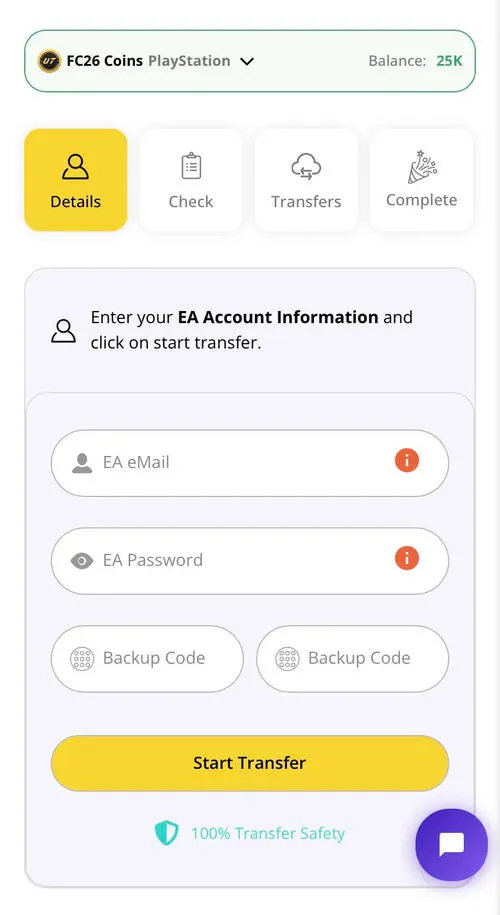
On the delivery page, enter your Ultimate Team account information — double-check that your details are correct. After entering your login data, click "Start Transfer" to begin the delivery process.
Step 4: System Verification
The system automatically checks your account details for accuracy. You can track delivery progress in real time using the Order Status bar on the page.
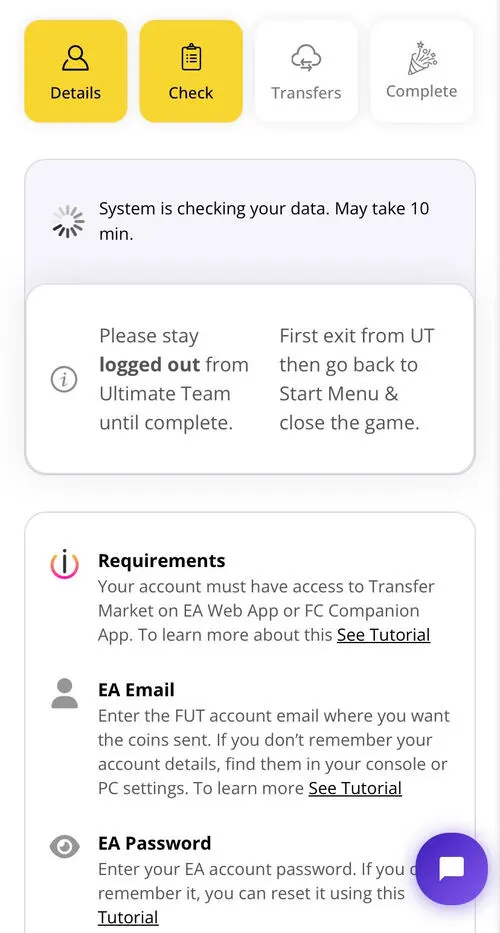
Step 5: Automatic Coin Transfer
Once verified, the automated system logs into your account and transfers the purchased coins. Your order status updates to "Transferring" with an estimated completion time — no manual steps needed on your end while this runs.

Step 6: Delivery Complete
Once your coins are delivered, the status changes to "Completed." Log back into Ultimate Team to see your updated balance, ready to spend on players, SBCs, or packs.

Comfort Trade vs. Player Auction
| Feature | Comfort Trade | Player Auction |
|---|---|---|
| Delivery approach | Automated, account-based delivery | Player listing/auction-based delivery |
| Manual player listing | Not required | Required |
| Convenience | Hands-off once submitted | More hands-on |
| Best for | Users who prefer automated delivery | Users who prefer staying logged into their own account throughout |
| Process | Submit account info and follow delivery instructions | List the required player and complete the transfer |
Tips for a Smooth Delivery
- Clear your active transfer list before submitting your account info — an empty transfer list generally makes the process smoother.
- Double-check your account details before clicking "Start Transfer" to avoid delays from incorrect information.
- Only submit your account details through the official MrGeek platform.
- Keep an eye on the Order Status bar so you know exactly what stage your delivery is at.
Frequently Asked Questions
What is Comfort Trade?
Comfort Trade is a delivery method where you provide account login details so the system can transfer purchased FC Coins directly, without you needing to list a player manually.
How does Comfort Trade work?
After payment, you submit your Ultimate Team account information. The system verifies the details, logs in, and transfers the coins automatically while you track progress through the order status bar.
What information do I need for Comfort Trade?
Your platform, the coin amount you're purchasing, completed payment, and correct Ultimate Team account login details.
How long does Comfort Trade delivery take?
Delivery time varies by order size and current demand — the Order Status bar gives you an estimated completion time once your transfer begins.
Is Comfort Trade different from Player Auction?
Yes. Comfort Trade uses your account login for an automated transfer, while Player Auction has you list a specific player that the seller purchases to complete the transfer.
Can I track my Comfort Trade order?
Yes, the Order Status bar shows real-time progress from verification through to completed delivery.
What should I do before starting a Comfort Trade?
Clear your active transfer list and double-check that your account login details are accurate before submitting them.
What can I do after my FC Coins are delivered?
Once your order status shows "Completed," log back into Ultimate Team to see your updated coin balance, ready to spend on players, SBCs, or packs.
Conclusion
Comfort Trade offers a straightforward, automated way to receive FC Coins directly into your Ultimate Team account. Complete your order, submit your account information, and follow the status bar through to delivery.
