


If you're seeing a "Transfer List is Full" or "You Have Unassigned Items" error, it means there's no free slot for a new item to be added to your account — including, in some cases, the player cards used to deliver Comfort Trade coins. This guide explains what the Transfer List is, why it fills up, and exactly how to clear space and resume normally.
Want to build your Ultimate Team faster? Explore the latest FC Coin options and buy FC Coins from MrGeek.
What Is the Transfer List in EA SPORTS FC?
The Transfer List (also called the Unassigned Pile or Tradepile) is where your Ultimate Team cards go when they're listed for sale or received into your account. It has a limited number of slots, and slots can fill up from listings, sold items, and unsold items sitting unattended.
What Does "Transfer List Full" Mean?
When your Transfer List has no free slots, new items — including the player cards used for Comfort Trade coin delivery — can't reach your account. The system pauses the process until space is available. It's a normal interface limitation, not a problem with your order.
How to Clear a Full Transfer List (Step by Step)
- 1
Go to Ultimate Team → Transfer → Transfer List and check how many cards are currently sitting there.
- 2
Clear sold items using the "Clear Sold" option.
- 3
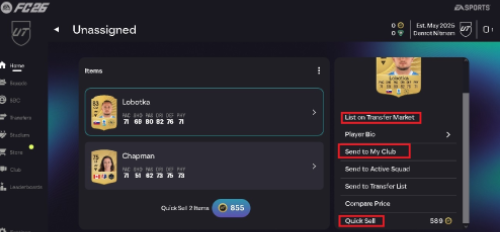
Remove unsold cards by relisting them, quick-selling them, or sending them back to your club.
-
- 4
Resume the transfer: go back to your delivery page and click "Try Again." With free space now available, the item will go through and the transfer will continue.
Why Does This Pause a Coin Transfer?
Comfort Trade delivers coins by listing or purchasing specific player cards through your Transfer List — these cards act as placeholders to move the coins. If your Transfer List is already full, there's no slot available for that card to be listed, which triggers the error. It's nothing to worry about; once you free up space, the transfer continues normally.
Tips:
- Keep free slots: Try to keep at least 10 free slots in your Transfer List before starting a transfer.
- Clear old listings: Regularly clear sold and expired listings rather than letting them build up.
- Upgrade capacity: If your game offers Transfer List capacity upgrades through objectives, consider using them.
What to Do With Unsold Players
When a listing expires without selling, you typically have a few options, depending on your game's interface:
- Relist — put the item back up for sale, sometimes at an adjusted price.
- Send to Club — move the item into your club instead of keeping it listed.
- Quick Sell — sell the item instantly for coins to free up the slot right away.
What Is the Unassigned Pile?
The Unassigned Pile holds items that have been received but not yet placed into your club — for example, new cards from packs, rewards, or an incoming transfer. If this area is also full, incoming items can't be assigned, which can compound the same "no space available" issue as a full Transfer List.
Why Is My Transfer List Still Full?
- Sold items haven't been cleared yet — use "Clear Sold" first.
- Expired/unsold listings are still occupying slots — relist, send to club, or quick-sell them.
- The Unassigned Pile is also full, which can block new items separately from the Transfer List itself.
- A large batch of items was received at once (e.g., from packs or rewards) without being sorted afterward.
How to Prevent Your Transfer List From Filling Up
- Clear sold items regularly instead of letting them accumulate.
- Review unsold listings and decide quickly whether to relist, send to club, or quick-sell.
- Check your Unassigned Pile periodically, not just your Transfer List.
- Keep a buffer of free slots before starting any transaction that requires Transfer List space.
Troubleshooting Table
| Problem | Possible Cause | What to Do |
|---|---|---|
| Transfer List is full | Too many listed items | Clear or manage existing listings |
| Sold items remain | Sold cards haven't been cleared | Use the "Clear Sold" option |
| Unsold items are taking space | Listings have expired | Relist, send to club, or remove them |
| New item cannot be added | No available space | Free up Transfer List or Unassigned Pile space |
| Coin transfer is paused | Required Transfer List space is unavailable | Clear space and click "Try Again" on your delivery page |
Item Status Reference
| Status | What It Means | Typical Action |
|---|---|---|
| Listed | Item is currently up for sale | Wait, or manage the listing |
| Sold | Item has sold | Clear the sold item |
| Unsold | Listing ended without a sale | Relist, send to club, or remove |
| Unassigned | Item is waiting to be assigned to your club | Review and manage available space |
Frequently Asked Questions
How do I clear my Transfer List in EA SPORTS FC?
Go to Ultimate Team → Transfer → Transfer List, use "Clear Sold" for completed sales, and relist, quick-sell, or send unsold items back to your club to free up space.
What does "Transfer List Full" mean?
It means every available slot on your Transfer List is occupied, so no new item — including certain coin-delivery cards — can be added until space is freed.
How many items can the Transfer List hold?
Capacity can vary by game version and may be upgradable through in-game objectives, so check your current game's Transfer List settings rather than assuming a fixed number.
How do I clear sold items from my Transfer List?
Open your Transfer List and use the "Clear Sold" option to remove completed sales in one action.
What should I do with unsold players?
Relist them, send them back to your club, or quick-sell them for instant coins — whichever fits how you want to manage that item.
What is the difference between the Transfer List and Unassigned Items?
The Transfer List holds items you've listed or that are pending sale/purchase. The Unassigned Pile holds items you've received but haven't yet placed into your club. Both have limited space and can each cause similar "full" errors.
Why can't I receive a new item when my Transfer List is full?
The system needs an open slot to place the incoming item. With no space available, it holds the item back until you clear room.
How can I prevent my Transfer List from becoming full?
Clear sold items regularly, deal with unsold listings promptly, check your Unassigned Pile periodically, and keep some free slots available before starting a new transaction.
What should I do if clearing the Transfer List does not solve the problem?
Double-check both your Transfer List and your Unassigned Pile, since either one being full can cause similar symptoms. If the issue persists after freeing space in both, reach out through MrGeek's support for help with your specific order.
