


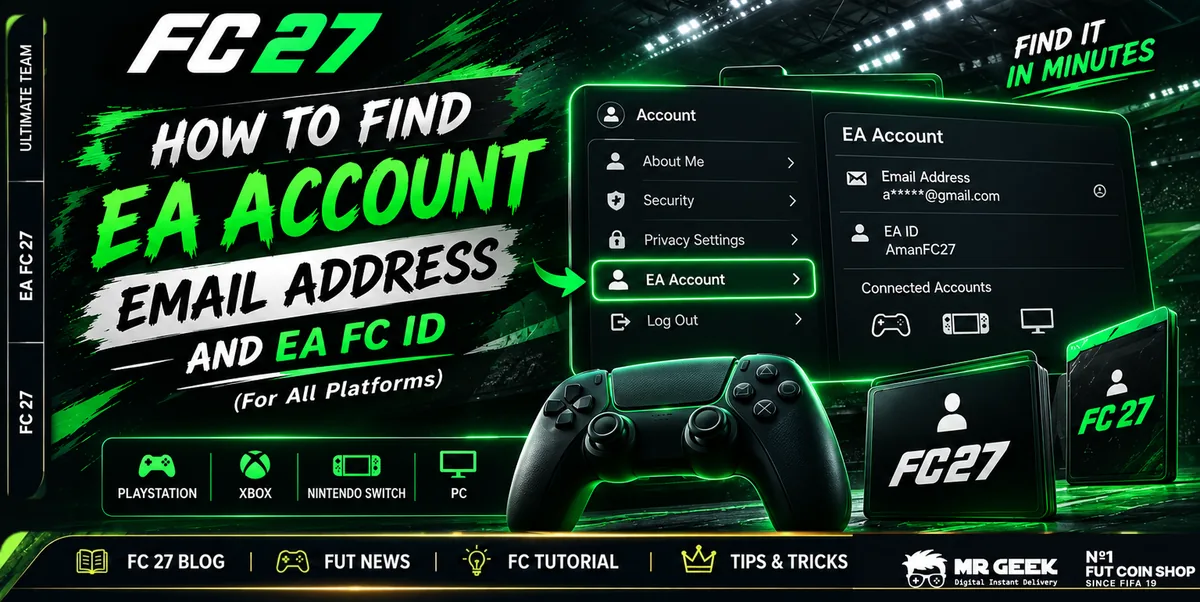
In-gamePS5 · XboxCustomise → Online Settings → EA Account
EA appPCSettings → My account → Manage
EA.comany devicesign in with the PlayStation or Xbox button
1 : 1one linkone PlayStation or Xbox account per EA Account
Quick answer: Your FC game and your Ultimate Team club belong to one EA Account (an email address). On PlayStation and Xbox you see it in the game under Customise → Online Settings → EA Account: there you find the email, your Public ID (EA ID) and the date you joined. On PC it is in the EA app under Settings → My account.
Am I using the right account? Check it in 1 minute
- Open ea.com/login in a private (incognito) browser window.
- Do not type an email. Click the PlayStation or Xbox button and sign in with your console account.
- EA opens exactly the EA Account that is linked to that console account.
- Under About Me you see part of its email. That is the EA Account of your game, and the Web App must use the same one.
Last updated: 5 November 2026
EA Account, EA ID, console account: what is what
| Name | What it is | Where you see it |
|---|---|---|
| EA Account (email) | your login at EA; your game, club and Web App belong to it | in the game, EA app, EA.com |
| EA ID / Public ID | your public name at EA, for friends and crossplay | same screen as the email |
| Member since | the day your EA Account was created | same screen |
| PlayStation / Xbox account | your console login (PSN ID, gamertag); it is linked to exactly one EA Account | console settings; on EA.com under Connected Accounts |
The EA Account is called many names: Origin account, FC account, FUT account, EA.com account or FIFA Ultimate Team account. It is always the same login.
How to find your EA Account on PS5, PS4 and Xbox
The path is the same on PlayStation and Xbox.
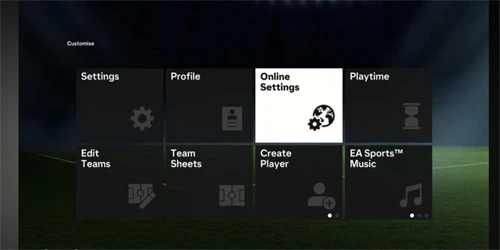
Open Customise
Start EA SPORTS FC and go to Customise. Select Online Settings.
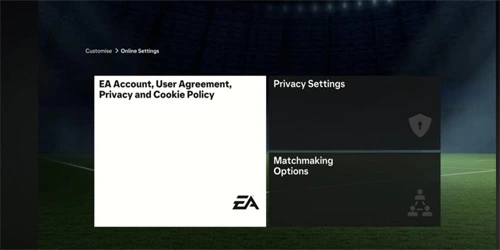
Open EA Account
Select EA Account, User Agreement, Privacy and Cookie Policy.
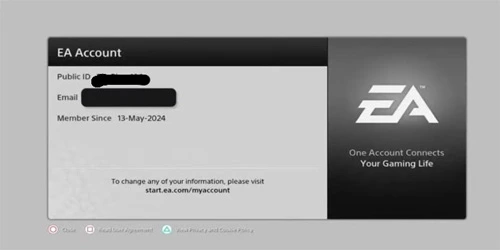
Read email and ID
You now see your Public ID (EA ID), the email of your EA Account and Member Since.
Details do not load?
Sometimes EA's servers do not load the account details. Close the window and try again a bit later.
Tip
Press R2 (PlayStation) or RT (Xbox) in this menu to open your friends list and search other players by EA ID.
How to find your EA Account on PC (EA app, Steam, Epic)
Open the EA app
Start the EA app and log in. Also if you bought FC on Steam or Epic, the game runs through the EA app.
Settings → My account
Click the menu (three lines) at the top left, then Settings and My account. On a Mac you find Settings in the EA app menu in the top bar.
Manage
Under My profile click Manage. Your account opens on EA.com, and under About Me you see your email.
How to find your EA Account on EA.com
Private window
Open a private (incognito) browser window. A normal window can show an old login from the cache.
Sign in with your platform
Go to ea.com/login and sign in with your phone number or with the PlayStation, Xbox or Steam button.
See the email
Open Manage My Account. Under About Me or Change Email Address you see part of the email of this EA Account. Under Connected Accounts you see which PlayStation, Xbox or Steam account is linked.
Which EA Account is my game on?
This is where most problems come from: people have two or three EA Accounts and log in to the Web App with a different one than their console uses. Then the club looks empty or the transfer market looks locked.
- One console account, one EA Account. Each EA Account can have only one PlayStation, one Xbox and one Steam account linked at a time.
- The club belongs to the EA Account that is linked to the console account you play with.
- The Web App and Companion App must be logged in with that same EA Account.
- Quick check: sign in on EA.com with the PlayStation or Xbox button (box at the top). The email you see there is the right one.
- Nintendo: linked Nintendo Accounts are not shown under Connected Accounts.
| Problem | What to check |
|---|---|
| Web App shows an empty or different club | you are logged in with another EA Account; sign in with the PlayStation or Xbox button |
| Cannot find the EA ID | in the game under Customise → Online Settings → EA Account |
| Cannot remember the email | same screen; or EA.com with the platform button |
| Several EA Accounts | check under Connected Accounts which one is linked to your console |
| Details do not match your console | you may be signed in to another EA Account than the linked one |
Why do I need my EA email and EA ID?
For logging in to the Web App and Companion App, for crossplay and friends, for account recovery, for linking new platforms and for coin deliveries with Comfort Trade, which need the exact EA Account of your club.
What if I cannot access the email anymore?
Your game stays tied to this EA Account. It cannot be moved automatically, but EA Support can help if you prove that the account is yours.
- Try the email provider first. Gmail, Outlook, Yahoo and others can often restore the mailbox with your phone number or security questions. This is the fastest way.
- Contact EA Help at help.ea.com/contact-us without logging in. Choose your game and platform and the topic account access or recovery, then chat or email.
- Have this ready: the old email address, proof of purchase (order confirmation, PayPal, Steam or Epic transaction), names you used in games, your platform IDs (PSN, gamertag, Steam ID) and a new email that you can access.
If EA can confirm that the account is yours, they can move it to the new email. Without access to the old email and without proof of purchase, EA cannot restore the account for privacy reasons.
FAQ
How do I find my EA Account?
In the game under Customise → Online Settings → EA Account (PlayStation, Xbox), in the EA app under Settings → My account (PC), or on EA.com after signing in.
Where can I find my EA ID?
On the same screen as your email. In FC it is called Public ID.
How do I find out which email belongs to my PlayStation or Xbox?
Sign in on EA.com with the PlayStation or Xbox button. EA opens the linked EA Account and shows part of its email.
Is the Xbox path the same as on PlayStation?
Yes, in FC it is Customise → Online Settings → EA Account on both.
I have more than one EA Account. Which one counts?
The one linked to the console account you play with. Check it under Connected Accounts on EA.com.
Why does my Web App club look different?
You are most likely logged in with another EA Account than your console uses.
Can I move my FC game to another EA Account?
No, the game stays with the EA Account. EA can only change the email of that account after checking it is yours.
What if I bought the game on Steam or Epic?
Then EA can check the purchase in your Steam or Epic history. A screenshot of the transaction with game and date helps.
Sources
- EA Help: How to find your EA Account email address (checked 5 Nov 2026)
- EA Help: How to link your platform accounts to your EA Account (checked 5 Nov 2026)