


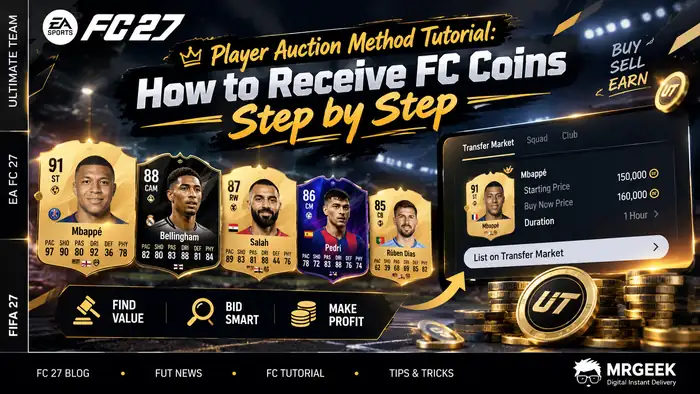
The Player Auction Method is one of two common ways to receive FC Coins into your Ultimate Team account, alongside Comfort Trade. This tutorial explains how Player Auction works and walks through the full process step by step — without sharing your account login.
What Is the Player Auction Method?
Player Auction is a delivery method that transfers coins through the in-game Transfer Market instead of sharing account login details. You buy a specific player, list it for sale at a set price, and the system purchases it from you — the difference in price is effectively the coin transfer.
How the Player Auction Method Works
You'll be given a list of specific players to buy from the Transfer Market. After buying one, you list it for sale at a price and duration the system provides, and it automatically buys it back from you. Repeating this for each listed player transfers your full coin balance over.
- 1
Buy a specific player from the in-game Transfer Market.
- 2
List it for a set price and duration — the system automatically buys it from you.
- 3
Once the purchase completes, the coins appear in your in-game balance.
Player purchase costs and any applicable EA transfer tax are factored in on the platform's end — you receive the full coin amount you ordered.
What You Need Before Starting
- An active Ultimate Team account with an available Transfer Market (console or Web/Companion App — the market must be unlocked if using the web app)
- Your current in-game coin balance
- Enough coins to purchase the listed players at the shown price
- A stable internet connection
- A completed order with access to your delivery panel/unique link
Step-by-Step Guide: Player Auction Transfer
Step 1: Confirm Your Transfer Market Is Active
Before starting, open the game on your console and confirm the Transfer Market is available. You can use either your console or the Web/Companion App, but the market must be active — or unlocked, if you're using the web app.
Step 2: Enter Your Current Coin Balance
On the Player Auction delivery page, enter the amount of coins currently in your in-game balance. This helps match you with suitable players for the transfer.
Step 3: Choose a Player
You'll see a list of available players to choose from. Pay attention to:
- Player name and version (some players have multiple cards, like TOTW or TOTS)
- Average price — the normal market value for that player
Step 4: Buy the Player
Buy the selected player from the Transfer Market at the maximum buy price shown on the delivery page.
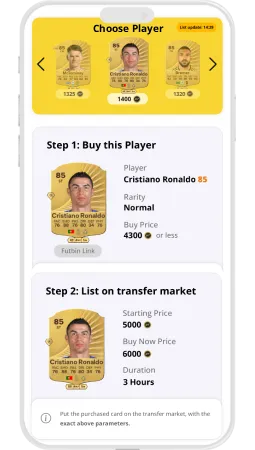
Avoid paying more than the listed maximum price, since this can affect accurate coin transfer.
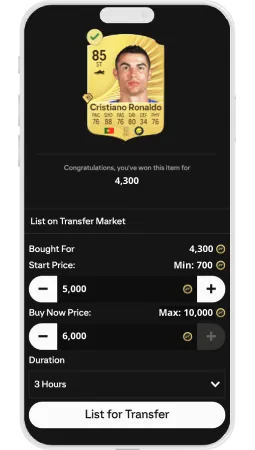
Step 5: List Your Player for Sale
After buying the player, list it for sale on your console or Web/Companion App using the details shown on the delivery page:
- Starting Price
- Buy Now Price (BNP)
- Listing Duration (1h, 2h, 3h, etc.)
Once listed, return to the delivery page. Avoid refreshing manually — prices and status update automatically.
Step 6: Let the System Find Your Player
Click Search on the delivery page. The system scans the Transfer Market to locate your listed player — this can take up to 90 seconds. When found, click Buy to complete the purchase.
Step 7: Wait for Confirmation
The status changes to Pending while the transaction completes, then updates to Bought once finished — your new coins will appear in your account.
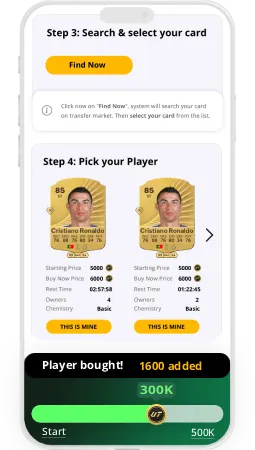
You can list multiple players while waiting; each is processed in order.
Step 8: Repeat for Remaining Coins
After one player sells, continue with the next until your full purchased coin amount is transferred. The remaining balance and player costs are adjusted automatically at each step.
Player Auction vs. Comfort Trade
| Method | How It Works | Best For |
|---|---|---|
| Player Auction | Coins are delivered through buying and listing specific players on the Transfer Market | Users who prefer not to share account login details |
| Comfort Trade | Coins are transferred directly by logging into the account | Users who prefer a more hands-off, automated process |
Important Notes and Tips
- Don't manually refresh the delivery page after listing a player — data updates automatically.
- Use the correct player card (version and rating); using the wrong one prevents the system from finding it.
- During high-traffic periods, "Pending" status may take a few minutes — this is normal.
Frequently Asked Questions
What is the Player Auction Method?
A delivery method that transfers FC Coins by having you buy and list specific players on the Transfer Market, rather than sharing your account login.
How does the Player Auction Method work?
You buy a listed player at the shown price, resell it at a set price and duration, and the system purchases it back from you — repeating this transfers your full coin order over time.
What do I need before using the Player Auction Method?
An active Transfer Market on your platform, your current coin balance, enough coins to buy the listed players, and access to your delivery panel after completing your order.
How long does Player Auction delivery usually take?
It varies by player availability and market activity. Searching for a listed player can take up to 90 seconds, and "Pending" status may take longer during high-traffic periods.
Can I use the Player Auction Method on different platforms?
Yes — it works through your console or the Web/Companion App, as long as your Transfer Market is active or unlocked.
Is the Player Auction Method the same as Comfort Trade?
No. Player Auction uses player listings on the Transfer Market, while Comfort Trade transfers coins directly through account login.
What should I do if I need help during the process?
If a step doesn't behave as expected — for example, a listed player isn't found — avoid repeatedly refreshing manually and reach out through MrGeek's support for assistance.