


The Transfer Market on the EA SPORTS FC Web and Companion Apps lets you buy and sell players, consumables, and other club items. Access isn't automatically granted to every account — especially at the start of a new game cycle — so if you've just created a new account and the market looks locked, that's normal. This guide explains why it happens and how to unlock it.
Give your Ultimate Team more flexibility with FC Coins from MrGeek. Explore FC Coins and choose an option that suits your needs.
Quick Answer: How to Unlock the Transfer Market
- Start Ultimate Team and complete the required introductory activities (the Foundation Objective Group).
- Play consistently — around three full matches per day for two consecutive days is a commonly reported pattern.
- Log into the Web App or Companion App on the same days you play.
- Complete relevant SBCs and objectives, and keep your account in good standing.
- Check your access status, and continue the activities above if it's still locked.
Check Your Current Access Status
You can check your access status directly on the EA Web and Companion App.
How to Unlock the Transfer Market
Step 1: Start Ultimate Team
Begin playing Ultimate Team and work through the introductory activities EA presents when you first start.
Step 2: Play Consistently
Play at least three full matches in Ultimate Team per day, and log into the Web App or Companion App on the same day to check your status. Repeating this for two consecutive days is a commonly reported pattern for building the activity EA looks for.
Tip: Playing more matches than this won't speed things up — it's about consistent, legitimate activity rather than volume.
Step 3: Complete Relevant Objectives and SBCs
Complete Squad Building Challenges and any specific objectives shown in Ultimate Team, and make sure your account is in good standing.
Step 4: Check Your Transfer Market Access
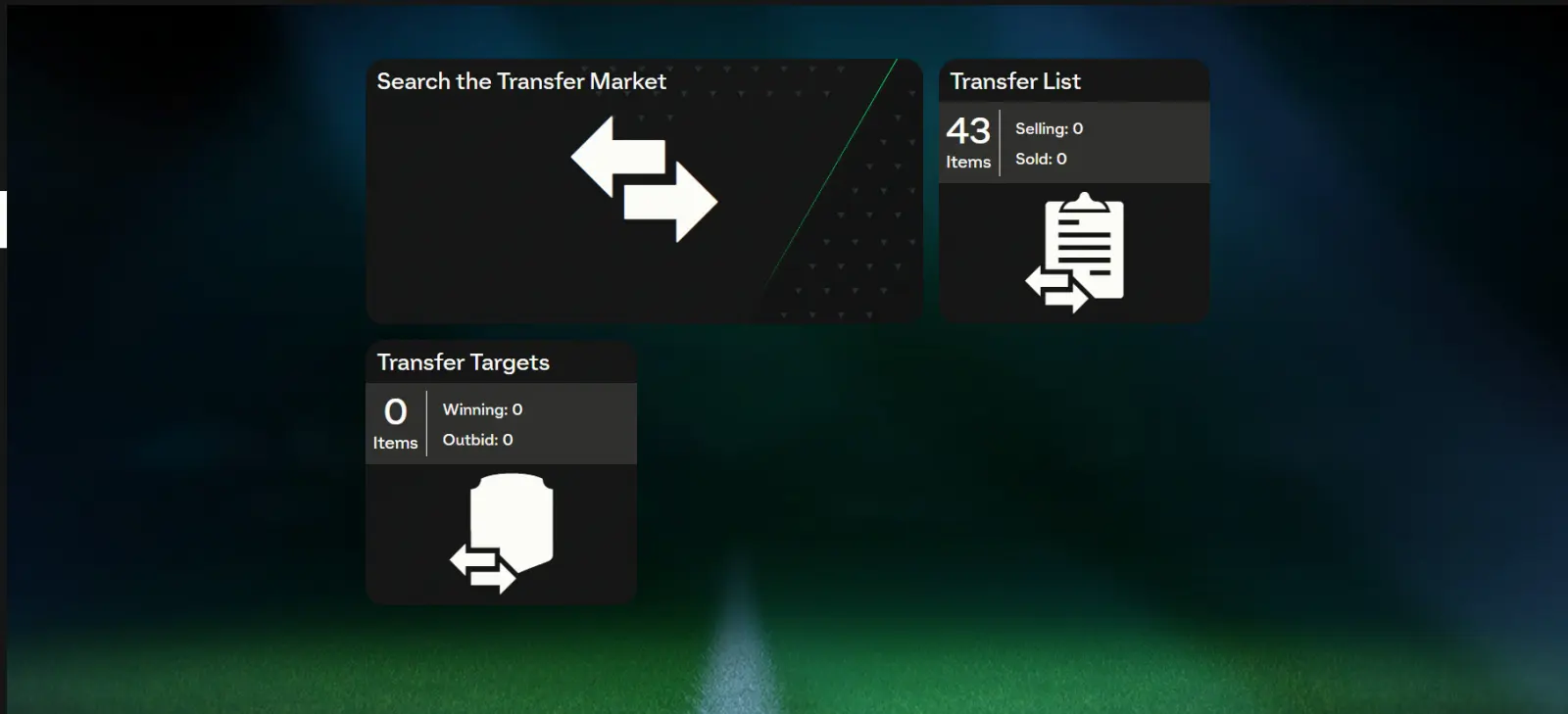
Open the Web App or Companion App and go to the Transfers tab. If access is granted, you'll see the full Transfer Market interface.
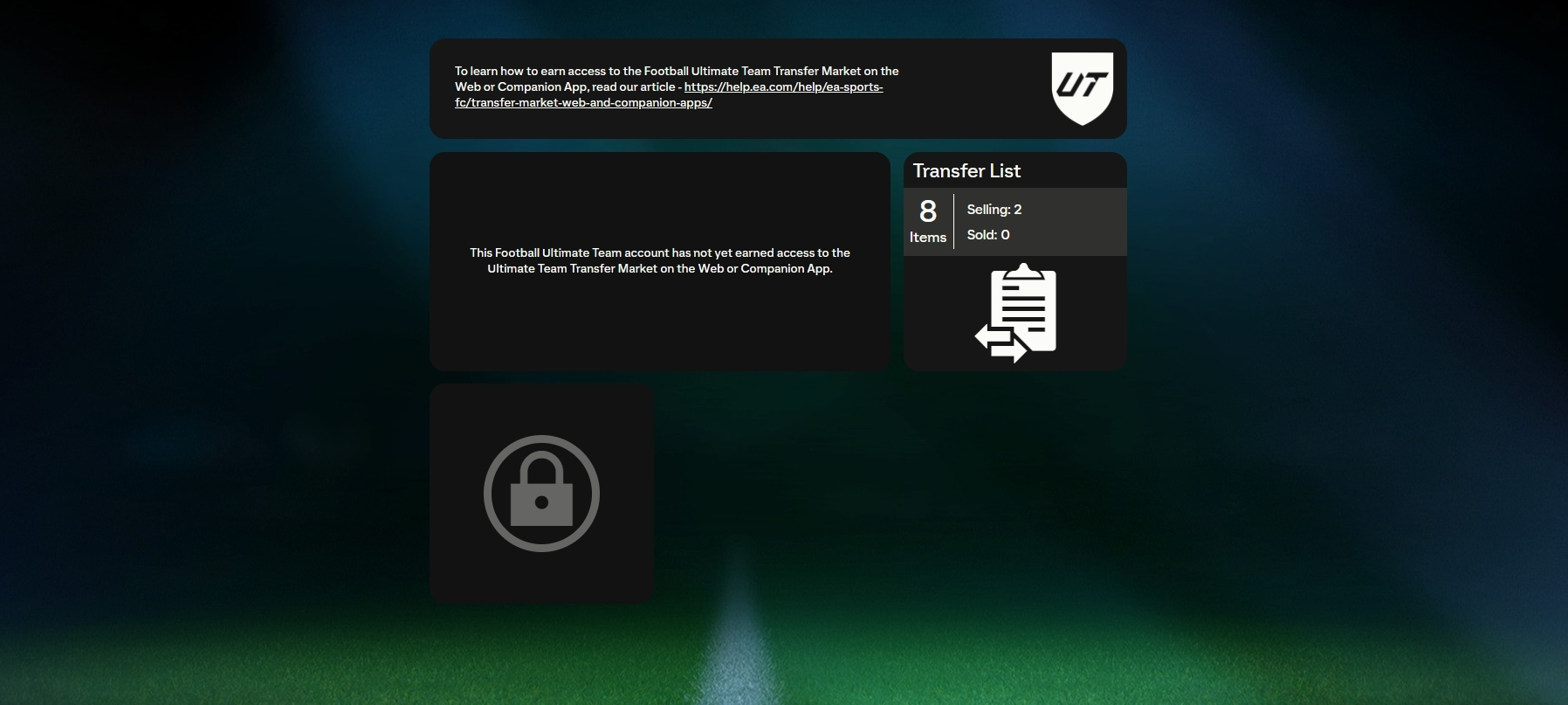
If access is still pending, you'll see a lock screen or message instead — you may also get an in-game notification once access is granted.
Step 5: Continue If Access Is Still Locked
Make sure Playtime Tracking is enabled on your EA Account, keep playing matches regularly, and continue logging into the Web App to check your status — repeated, consistent activity is what triggers access.
Unlock Process at a Glance
| Stage | What to Do | What to Check |
|---|---|---|
| 1 | Start Ultimate Team | Complete the introductory setup |
| 2 | Play through the required activities | Follow the objectives shown in Ultimate Team |
| 3 | Complete relevant objectives | Check for Transfer Market–related requirements |
| 4 | Check Transfer Market access | See whether access has been enabled |
| 5 | Still locked? | Continue the required activities and review account requirements |
Why Is the Transfer Market Locked?
If you open the Companion App or Web App and see a message like "Your account does not have access to the Transfer Market on the Web App yet," it can happen for a few reasons:
- New or inactive accounts: New Ultimate Team accounts must complete the Foundation Objective Group ("On Your Way") before full Transfer Market access is unlocked. After completing it, PC players typically get full access within 48 hours, and console players within 24 hours. During that waiting window, you can list items but can't search, bid, or buy yet.
- Multiple accounts on one device: If your console or PC has been used for several Ultimate Team accounts, access may take longer for each one.
- Security flags or terms violations: Suspicious activity, incomplete verification, or terms violations can lead to temporary or permanent restrictions. If you buy coins from a third party, sticking to one established seller rather than mixing different sellers/methods can reduce this kind of risk.
How Long Does It Take to Unlock?
| Scenario | Typical Unlock Time |
|---|---|
| Returning player with market access from the previous EA SPORTS FC title | Immediate or very fast |
| New account in good standing | 2–4 active days |
| Multiple accounts on the same device | 4+ active days |
| Shared devices (family/friends) | May take longer |
Note: There's no way to skip or bypass this process. Returning players from the previous title's Web and Companion Apps usually unlock immediately on the current one, while new accounts need to build activity from scratch.
What You Can Do on Web App or Companion App
- List and buy items on the Transfer Market (once fully unlocked)
- Complete Squad Building Challenges
- Manage your squad and club items
- Use consumables
- Open packs with FC Coins or FC Points
- Recover recently quick-sold items
- Monitor Team of the Week and promos
Note: During the 24–48-hour waiting period after completing the Foundation Objective Group, you can list items but cannot search or buy on the Transfer Market yet.
Special Cases
- Nintendo Switch users: Transfer Market access is available, but only for trading within the Nintendo Switch user base — cross-platform trading isn't supported.
- Returning players: Players returning on the same platform in good standing typically skip the graduated access process and get immediate Transfer Market access, both in-game and on the Web App/Companion App.
Transfer Market Still Locked?
| Problem | What to Check |
|---|---|
| Transfer Market is still locked | Check your active Ultimate Team objectives |
| You completed the introductory activities | Review whether additional requirements are shown |
| Transfer Market access is missing | Confirm you're using the correct EA Account |
| Access still hasn't appeared | Restart Ultimate Team and check again |
| Nothing changes | Check EA Help for account-specific assistance |
Tips for Completing Transfer Market Requirements
- Focus on the objectives shown in Ultimate Team rather than unrelated activities.
- Complete introductory tasks before moving on to anything else.
- Check your objectives regularly so nothing expires unused.
- Follow any Transfer Market–related requirements shown in-game.
- Keep your EA Account details consistent, and avoid switching devices or accounts frequently.
Final Notes
- The Transfer Market unlocks automatically after consistent, rule-abiding activity — there's no way to speed this up artificially.
- New accounts must complete the Foundation Objective Group before access is granted, followed by the 24-hour (console) or 48-hour (PC) waiting period.
- EA advisors cannot manually grant access or skip the process for you.
- If you've been consistently active and your market remains locked, contact EA Help for account-specific support.
Frequently Asked Questions
How do I unlock the Transfer Market in EA FC?
Complete the introductory Foundation Objective Group, play consistently and log into the Web App on the same days, complete relevant objectives and SBCs, then check your access status.
Why is my EA FC Transfer Market still locked?
Usually because you haven't completed the required introductory activities yet, you're still in the waiting period after completing them, or your account has multiple-device/security flags affecting access timing.
How long does it take to unlock the Transfer Market?
It varies — returning players from the previous title's Web App usually unlock immediately, while new accounts in good standing typically take a few active days. There's no guaranteed fixed timeframe for every account.
Do I need to complete Ultimate Team objectives to unlock the Transfer Market?
Yes, completing the Foundation Objective Group and relevant ongoing objectives is part of the unlock process for new accounts.
Can I access the Transfer Market immediately after starting Ultimate Team?
Generally no, unless you're a returning player from the previous title's Web App in good standing — new accounts need to build activity first.
Why can another account access the Transfer Market but mine cannot?
Access timing can depend on account history, whether it's a returning or new account, and factors like multiple accounts sharing the same device.
Does Transfer Market access depend on the EA Account?
Yes, access status is tied to your specific EA Account and its activity history, not just the platform you're playing on.
What should I do if I completed the requirements but the Transfer Market is still locked?
Double-check you're signed into the correct EA Account, restart Ultimate Team and check again, and if it's still locked after consistent activity, contact EA Help for account-specific support.
