


Backup codes let you log into your EA Account when your usual Two-Factor Authentication (2FA) method isn't available. If yours aren't showing up or aren't working, it's usually one of a few common causes — here's why, and how to fix it.
Need extra FC Coins to improve your squad? Explore the latest options and buy FC Coins from MrGeek.
Quick Answer: Why EA Backup Codes May Not Work
- The code has already been used — each one is one-time only.
- 2FA isn't enabled, so no backup codes have been generated.
- You're signed into a different EA Account than the one the codes belong to.
- The code was typed incorrectly or you're using an outdated set.
How to Get New EA Backup Codes
- 1
Go to myaccount.ea.com/cp-ui/security/index and log in to your EA Account.
- 2
Open Security & Privacy Settings from the menu.
- 3
Go to the Two-Factor Authentication section.
- 4
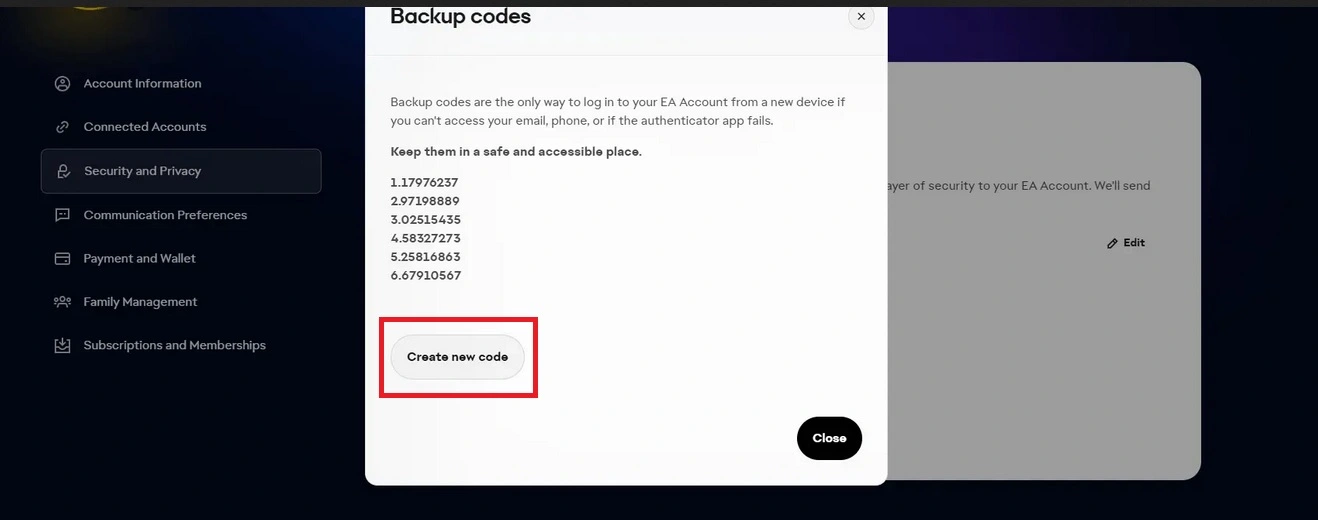
Click View Backup Codes.
- 5
Select Create New Backup Codes.
- 6
Save the new codes somewhere secure — EA generates 6 fresh codes each time.
Common Reasons EA Backup Codes Don't Work
1. Two-Factor Authentication Is Not Enabled
- If you don't see any backup codes in your EA Account, 2FA usually hasn't been turned on yet.
- Enable 2FA in the Security & Privacy section of your account settings first — see this 2FA setup tutorial if you need help.
- Once 2FA is active, the backup codes option will appear.
2. A Backup Code Has Already Been Used
- EA provides 6 unique backup codes, and each one works only once.
- Used codes turn grey in your account; unused codes stay bold and black.
- Trying to reuse an old code won't work — you'll need to generate a new set.
3. You're Using the Wrong EA Account
- Many players have more than one EA Account without realizing it.
- If none of your codes work, double-check you're signed into the correct account.
- Make sure the codes you're entering belong to the account you're trying to access.
4. Other Common Issues
- The code was typed incorrectly — codes can contain similar-looking characters.
- You're using an old set after already generating new codes.
- Confusion between your 2FA app code and a backup code — they aren't the same thing.
Troubleshooting
| Problem | Possible Cause | What to Do |
|---|---|---|
| Backup code doesn't work | Code was already used | Generate a new set |
| No backup codes appear | 2FA isn't enabled | Check EA Account security settings |
| None of the codes work | Wrong EA Account | Confirm you're using the correct account |
| New codes still don't work | Account/security issue | Recheck 2FA and EA Account settings |
| If This Happens | Try This |
|---|---|
| One code doesn't work | Try another unused backup code |
| All old codes fail | Generate a new set |
| No backup codes are visible | Check that 2FA is enabled |
| Codes belong to another account | Sign into the correct EA Account |
| You still cannot access the account | Use EA Account recovery/support options |
Before You Try Another Backup Code
- Make sure you're using the correct EA Account.
- Confirm the code hasn't already been used.
- Use a newly generated code if your previous set is no longer valid.
- Check that 2FA is enabled.
- Enter the code carefully.
- Keep your new backup codes stored somewhere secure.
Frequently Asked Questions
Why are my EA backup codes not working?
Usually because the code was already used, 2FA isn't enabled, you're signed into the wrong EA Account, or the code was entered incorrectly.
How do I get new EA backup codes?
Go to EA Account Security & Privacy → Two-Factor Authentication → View Backup Codes → Create New Backup Codes.
How many EA backup codes can I have?
EA generates 6 codes at a time when you create a new set.
Can I use an EA backup code more than once?
No, each backup code is for one-time use only. Once used, it turns grey and won't work again.
Why can't I see my EA backup codes?
If no codes appear, 2FA likely hasn't been enabled yet — turn it on in Security & Privacy settings and the backup codes option will appear.
What should I do if all my EA backup codes stop working?
Generate a completely new set from the Two-Factor Authentication section, and confirm you're using the correct EA Account.
Can I use backup codes if I lose access to my 2FA method?
Yes — backup codes exist specifically as an alternative way to log in when your usual 2FA method isn't available.
How do I make sure I'm using the correct EA Account?
Check the email or EA ID shown in your account settings and confirm it matches the account the backup codes were generated for — some players have more than one EA Account without realizing it.
